- In WordPress admin, go to the Havenlytics Properties menu and open Settings.
- Open the Agent Workspace tab.
- On the General sub-tab, find the Workspace Shell card.
- Turn on Enable Workspace.
- Save your settings.
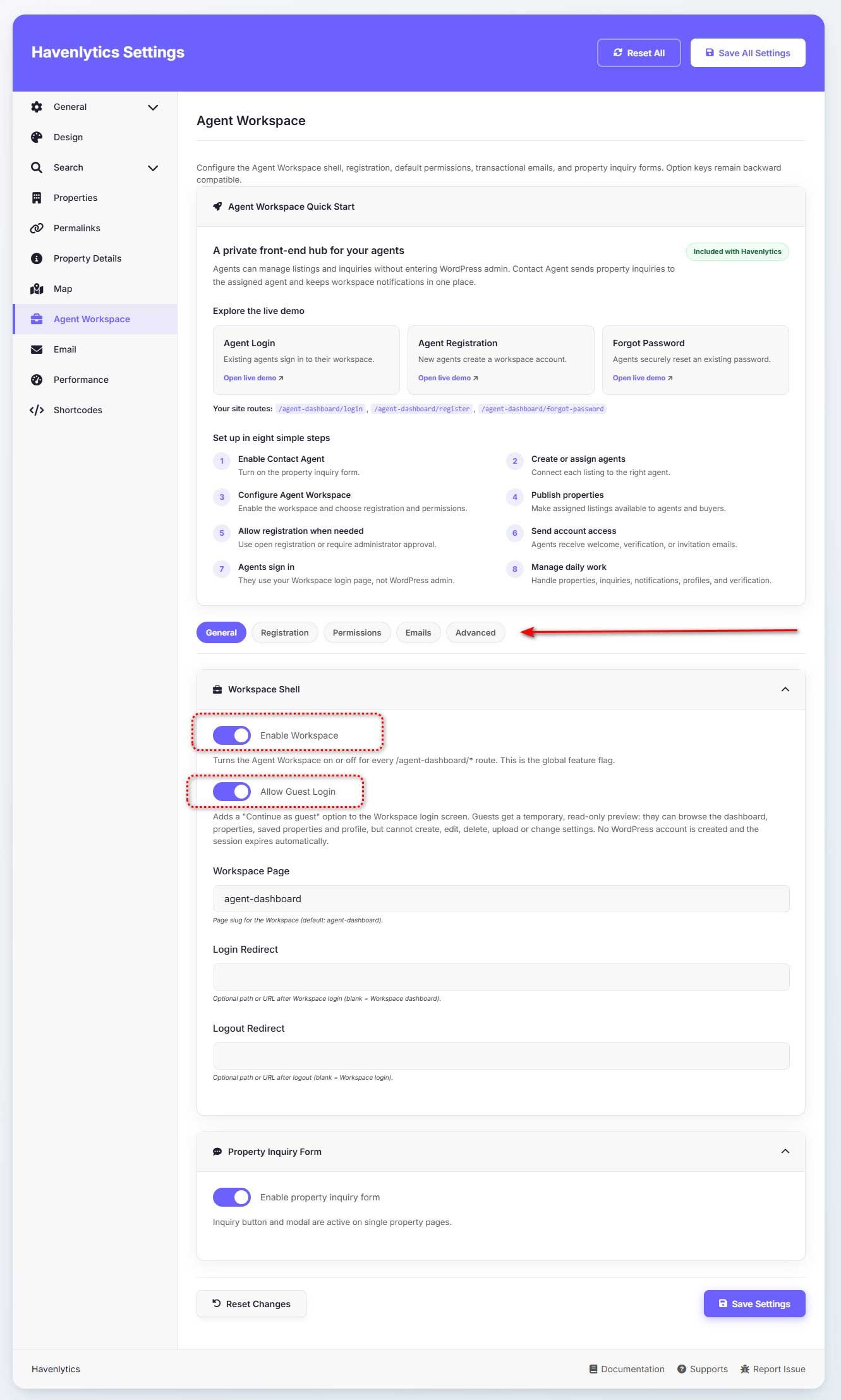
The Agent Workspace is off by default. When you enable it, Havenlytics automatically creates the Agent Dashboard page (slug agent-dashboard) with the [hvnly_agent_dashboard] shortcode. The shortcode takes no attributes.
The General sub-tab also contains:
| Setting | What it does |
|---|---|
| Enable Workspace | The global feature flag. Turns the workspace on or off for every /agent-dashboard/* route. |
| Allow Guest Login | Adds a “Continue as guest” option to the login screen for a temporary read-only preview. Off by default. |
| Workspace Page | The slug of the workspace page. Default: agent-dashboard. |
| Login Redirect | Where users land after signing in. Leave blank for the Workspace dashboard. |
| Logout Redirect | Where users land after signing out. Leave blank for the Workspace login screen. |
The Agent Workspace tab has five sub-tabs: General, Registration, Permissions, Emails, and Advanced.
Emergency kill switch: adding define( 'HVNLY_WORKSPACE_ENABLED', false ); to wp-config.php forces the workspace off regardless of the settings toggle. Setting the constant to true does not override the toggle.
Registration settings
On the Registration sub-tab, the Workspace Registration card controls how agents sign up. Workspace registration is independent of the WordPress “Anyone can register” setting.
| Setting | Options |
|---|---|
| Registration Mode | Disabled — no self-registration. Open Registration (default) — new accounts are activated and signed in immediately. Admin Approval — new accounts wait in a Pending state until an administrator approves them. |
| Default Role | The WordPress role assigned to new accounts. Agent (hvnly_agent). |
When Admin Approval is on, the new agent sees “Account created and awaiting administrator approval,” receives a “We received your registration” email, and the site administrator receives a “New agent awaiting approval” email. Approve or reject accounts from the Agents admin screen (see Administrator Workspace below).
Workspace Overview
The workspace navigation is split into two groups:
Workspace
- Dashboard
- Properties
- Saved Properties
- Inquiries
- Profile
- Analytics
Account
- Notifications
- Settings
The workspace also provides its own frontend authentication screens: login, register, forgot password, and reset password (for example /agent-dashboard/login). Password resets use standard WordPress reset keys; the plugin only brands the emails and hosts the reset form. Reset links are single-use and expire after 24 hours.