The Havenlytics template override system lets you replace any bundled template from your own theme without touching a single plugin file. It uses the same theme-first resolution model as WooCommerce: for each candidate template, Havenlytics looks in your theme first and falls back to the plugin only if the theme has nothing to offer. Master the lookup order below and you can restyle a price field, redesign a single-property layout, or reskin the agent portal — all in an upgrade-safe way. This is the definitive override guide within the Havenlytics Developer Documentation.
Warning: Never edit files inside the plugin’s
templates/directory. Every plugin update overwrites them and your changes are lost. The override system exists precisely so you never have to.
The exact lookup order
When the loader resolves a template name (via hvnly_locate_template() / the loader’s locate_template()), it checks these locations in order and returns the first file that exists:
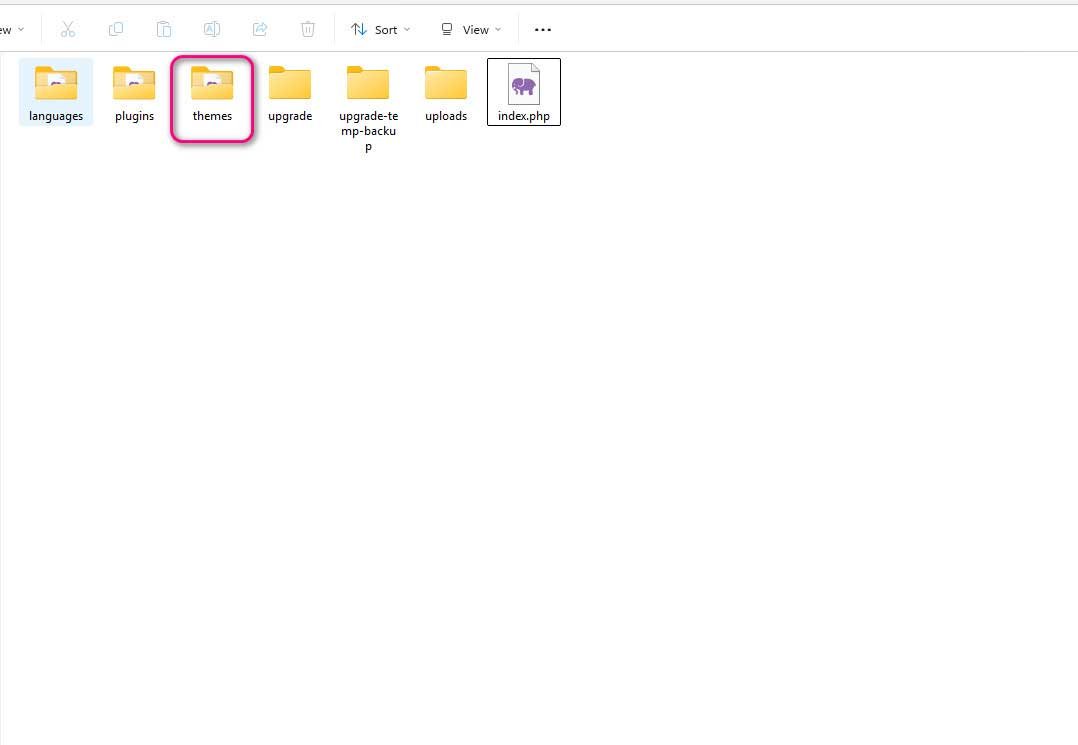
{theme}/havenlytics/{template_path}— the child theme first, then the parent theme.{theme}/{template_path}— the theme root, child then parent (a legacy/flat fallback).{plugin}/templates/{template_path}— the plugin’s bundled default.
The theme override folder name is havenlytics/. It comes from the loader’s $template_path property and is filterable with hvnly_template_path. The relative sub-path inside that folder must mirror the plugin’s templates/ tree exactly — same folders, same filename.
Note: Because the child theme is checked before the parent, a child theme can override a template the parent theme already customized. This is the standard, recommended place to put your overrides.
How to override a template: the rule
Take the plugin-relative path of the template you want to change, and recreate it under havenlytics/ in your theme. That’s it. The tree below the override folder is identical to the plugin’s templates/ tree.
Warning: Mirror the tree exactly. If the plugin file is
templates/archive/fields/price.php, the override must behavenlytics/archive/fields/price.php— nothavenlytics/price.phpand nothavenlytics/fields/price.php. A mismatched path is silently ignored and the plugin default keeps rendering.
Worked example 1: override an archive price field
The property archive renders each card’s price through a field partial. To restyle it:
| Role | Path |
|---|---|
| Plugin default | templates/archive/fields/price.php |
| Your theme override | wp-content/themes/your-theme/havenlytics/archive/fields/price.php |
Inside the override you have the archive card variables available (loaded through extract($args)): $property_id, $property_data, $mode, and in preset mode $field. A minimal override:
<?php
/**
 * Theme override: havenlytics/archive/fields/price.php
 * Available: $property_id, $property_data, $mode, $field
 */
if ( ! defined( 'ABSPATH' ) ) {
    exit;
}

$price = isset( $property_data['price'] ) ? $property_data['price'] : '';
if ( '' === $price ) {
    return;
}
?>
<div class="my-card-price">
    <span class="my-card-price__amount"><?php echo esc_html( $price ); ?></span>
</div>
Worked example 2: override a single-property preset field
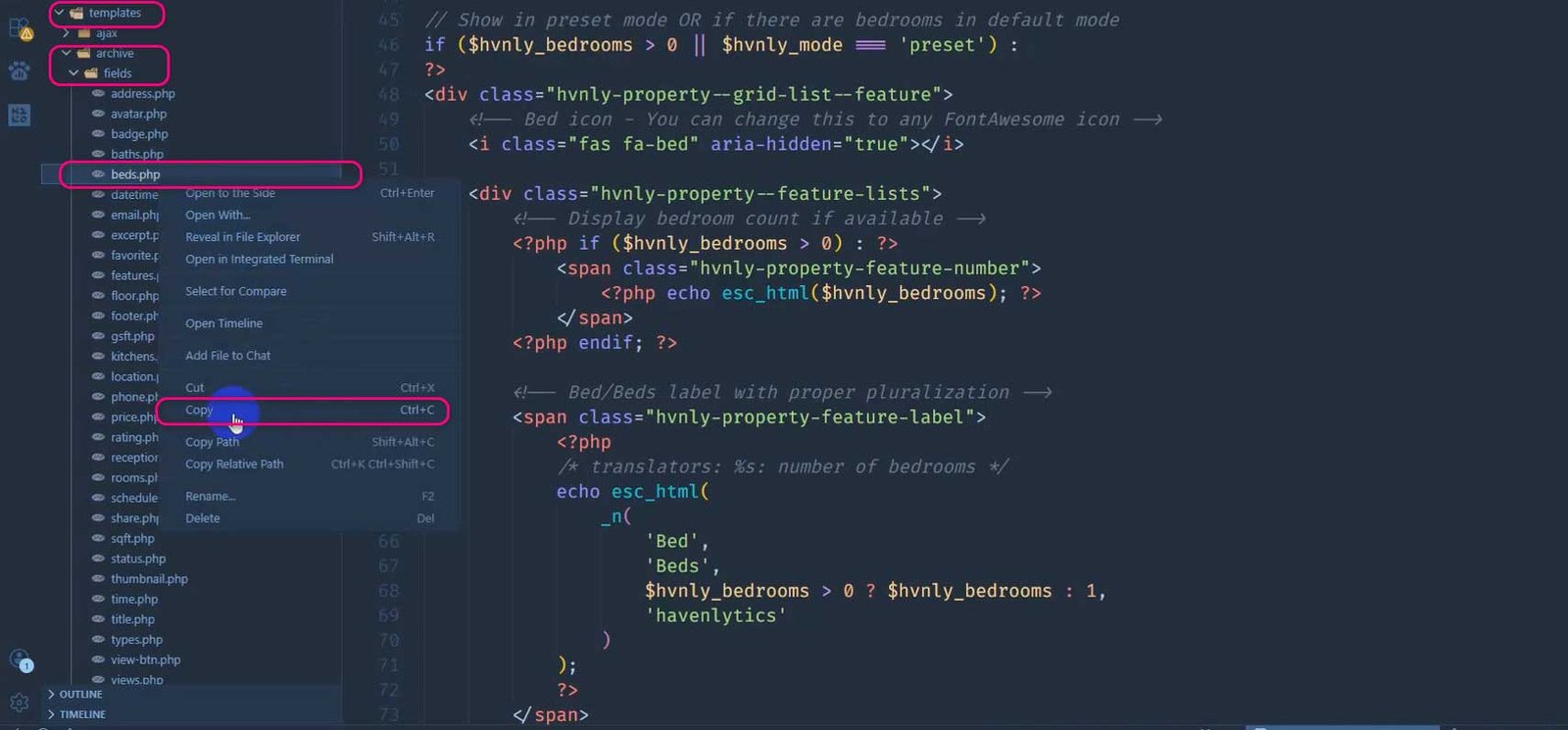
Single-property field templates resolve as single-property/fields/{category}/{template_name}.php, where {category} is default, preset, or group. To override the bedrooms preset field on the single property page:
| Role | Path |
|---|---|
| Plugin default | templates/single-property/fields/preset/bedrooms.php |
| Your theme override | wp-content/themes/your-theme/havenlytics/single-property/fields/preset/bedrooms.php |
Here the available variables come from PropertySingleRenderer::render_field(): $field, $value/$field_value, $property_id, $field_name (the meta key), $field_label, $field_type, $category, and $field_options.
<?php
/**
 * Theme override: havenlytics/single-property/fields/preset/bedrooms.php
 * Available: $field, $value, $property_id, $field_name, $field_label, $field_type, $category
 */
if ( ! defined( 'ABSPATH' ) ) {
    exit;
}

if ( '' === $value || null === $value ) {
    return;
}
?>
<li class="my-feature my-feature--beds">
    <span class="my-feature__label"><?php echo esc_html( $field_label ); ?></span>
    <span class="my-feature__value"><?php echo esc_html( $value ); ?></span>
</li>
Tip: If you want to override a field for every property regardless of category, remember the resolution falls back from
{category}/to a legacy flat map to a genericfallback-field. Copy the specific{category}/{name}.phpfile to guarantee your version wins.
Worked example 3: override an agent-portal (Workspace) template
The Agent Workspace resolves its templates under a dedicated sub-directory, WorkspaceConstants::TEMPLATE_SUBDIR = 'agent-portal'. Its override order is: {theme}/havenlytics/agent-portal/{template}.php first, then the plugin default. To reskin the Workspace login screen:
| Role | Path |
|---|---|
| Plugin default | templates/agent-portal/login.php |
| Your theme override | wp-content/themes/your-theme/havenlytics/agent-portal/login.php |
Note: Only the allow-listed Workspace basenames resolve —
canvas,dashboard,unavailable,login,register,forgot-password,reset-password. Overriding any other basename inagent-portal/has no effect unless you extend the list viahvnly_workspace_allowed_templates.
Resolution filters
Every stage of resolution is filterable, so you can relocate the override folder, change the plugin fallback, or swap the located file outright.
| Filter | What it controls |
|---|---|
hvnly_template_path | The theme override folder name (default havenlytics/). |
hvnly_default_path | The plugin fallback base directory. |
hvnly_locate_template | The located path; receives located, names, template_path, default_path. |
hvnly_get_template | The final located file inside hvnly_get_template(), before include. |
hvnly_get_template_part_templates | The candidate list built by hvnly_get_template_part(). |
hvnly_templates_location | The plugin’s default templates directory returned by hvnly_templates_location(). |
The Workspace has a parallel set: hvnly_workspace_template_path, hvnly_workspace_default_path, hvnly_workspace_locate_template, and hvnly_workspace_allowed_templates.
Example — point the override folder at a custom sub-directory of your theme:
<?php
add_filter( 'hvnly_template_path', function ( $path ) {
    // Themes now override from {theme}/my-real-estate/ instead of {theme}/havenlytics/
    return 'my-real-estate/';
} );
Performance: Filters like
hvnly_locate_templateandhvnly_get_templaterun on every template lookup, which can be hundreds of times on an archive page. Keep them cheap — no database queries, no filesystem scans — or you will pay for it on high-traffic listings.
Lifecycle actions
Two actions fire around every hvnly_get_template() include, letting you inject markup without replacing the whole template:
hvnly_before_template_part— fires immediately before the file is included. Args:$template_name,$template_path,$located,$args.hvnly_after_template_part— fires immediately after. Same args.
hvnly_get_template_part() additionally fires a dynamic hvnly_get_template_part_{$slug} action. The Workspace mirrors these with hvnly_workspace_before_template and hvnly_workspace_after_template.
<?php
// Append a disclaimer after the single-property content part renders.
add_action( 'hvnly_after_template_part', function ( $template_name, $template_path, $located, $args ) {
    if ( 'content-single-property.php' === $template_name ) {
        echo '<p class="listing-disclaimer">' . esc_html__( 'Prices subject to change.', 'your-textdomain' ) . '</p>';
    }
}, 10, 4 );
Tip: Reach for these actions before you copy a whole template. If all you need is to add a badge or a disclaimer, an action keeps you fully upgrade-safe and avoids maintaining a forked template.
Common templates and their override paths
| Purpose | Plugin default | Theme override |
|---|---|---|
| Single property entry | templates/single-property.php | havenlytics/single-property.php |
| Single property body | templates/content-single-property.php | havenlytics/content-single-property.php |
| Property archive entry | templates/archive-property.php | havenlytics/archive-property.php |
| Archive price field | templates/archive/fields/price.php | havenlytics/archive/fields/price.php |
| Archive loop | templates/archive/property-loop.php | havenlytics/archive/property-loop.php |
| Single agent entry | templates/single-agent.php | havenlytics/single-agent.php |
| Agency taxonomy | templates/taxonomy-hvnly_agent_agency.php | havenlytics/taxonomy-hvnly_agent_agency.php |
| Single-property preset field | templates/single-property/fields/preset/bedrooms.php | havenlytics/single-property/fields/preset/bedrooms.php |
| Search filter sidebar | templates/search/filter-sidebar.php | havenlytics/search/filter-sidebar.php |
| Map container | templates/map/map-container.php | havenlytics/map/map-container.php |
| Workspace login | templates/agent-portal/login.php | havenlytics/agent-portal/login.php |
Best practices
- Do your overrides in a child theme so a parent-theme update never wipes them.
- Override the narrowest template that solves the problem — a field partial beats a whole entry file.
- Keep the copied file thin: change only what you must, and preserve the variables the renderer passes in.
- Prefer a lifecycle action (
hvnly_before/after_template_part) over a full copy whenever you are only adding, not replacing, markup. - Document each override in a comment header so the next developer knows which plugin file it shadows.
Security notes
Security: Overridden templates receive the same unescaped variables as the originals. Escape on output —
esc_html(),esc_attr(),esc_url(),wp_kses_post()— and guard direct access withif ( ! defined( 'ABSPATH' ) ) { exit; }.
Security: When extending the Workspace allow-list via
hvnly_workspace_allowed_templates, add only fixed, known basenames. Never derive an allowed name from request data — that reopens the arbitrary-inclusion hole the allow-list exists to close.
Common mistakes
- Copying a template to
{theme}/havenlytics/price.phpinstead of mirroring the full sub-path{theme}/havenlytics/archive/fields/price.php. - Editing plugin
templates/files directly — lost on the next update. - Putting overrides in the parent theme, then losing them when the parent updates. Use a child theme.
- Overriding a non-allow-listed Workspace basename and wondering why nothing changes.
- Re-declaring or unsetting variables the renderer provides, breaking downstream markup.
- Adding expensive logic in
hvnly_locate_template, slowing every card on an archive page.