If you’ve started researching how to build a real estate website with WordPress, you’ve probably run into two very different types of products claiming to do the same job: real estate themes and real estate plugins.
Some vendors sell one. Some sell the other. Some sell something that’s technically both, bundled together and marketed as a complete solution. And almost nobody explains, in plain terms, what the difference actually is or why it matters months after launch rather than on day one.
That’s the gap this article closes. Not a sales pitch for one category over another — an explanation of what themes and plugins actually do in WordPress, why real estate websites in particular are sensitive to this choice, and how to decide which approach fits your project.
We covered this decision briefly as Step 2 of How to Build a Real Estate Website with WordPress . This article is the deeper version.
What Is a WordPress Theme?
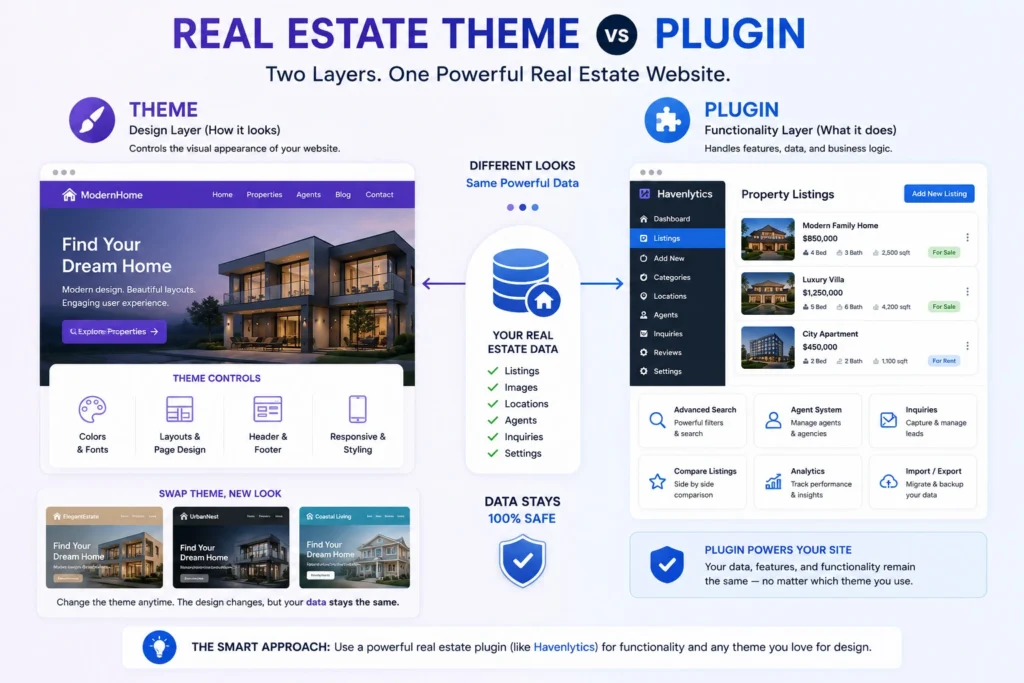
A WordPress theme controls how your site looks and, to a large extent, how its pages are laid out.
Colors, fonts, spacing, header and footer design, homepage structure, how a blog post or a page is arranged — that’s theme territory. Switch your theme and your site’s appearance changes, sometimes dramatically, while the content underneath (your pages, posts, and — depending on how it was built — your data) is supposed to stay put.
That word “supposed” is doing important work, and we’ll come back to it.
Themes range from free options in the WordPress.org directory to premium themes sold by third-party marketplaces, often built for a specific type of business: restaurants, portfolios, online stores, and — relevant here — real estate.
What Is a WordPress Plugin?
A WordPress plugin adds functionality. It doesn’t (usually) change how your site looks; it changes what your site can do.
A contact form plugin adds forms. An SEO plugin adds meta tags and sitemaps. A real estate plugin adds the machinery a property website needs: structured listings, search, agent profiles, and whatever else the plugin is built to handle.
Plugins are designed to work independently of whichever theme you’re running. Install a different theme, and a well-built plugin keeps functioning exactly as before — because the plugin owns the functionality and the data, not the theme.
You can run many plugins at once, each handling one job, and swap your theme without touching any of them.
Theme vs Plugin, Explained Simply
The cleanest way to think about it: a theme is the outfit; a plugin is the skill.
Changing an outfit doesn’t change what a person knows how to do. If your real estate functionality lives in a plugin, changing your theme is genuinely cosmetic — new look, same listings, same search, same data.
The complication in the real estate space specifically: many “real estate themes” don’t respect that separation. They build listing functionality into the theme itself — custom post types, data structures, and settings that only exist because that particular theme created them. The outfit and the skill become the same object.
That’s not always a design flaw — for a simple project it can be a convenient shortcut. But it creates a specific, predictable risk, which is the subject of the next two sections.
Why Many Real Estate Themes Cause Problems
A theme-bundled real estate solution usually works fine on day one. The problems show up later, at three predictable moments.
When you want a redesign. Your site has grown, your brand has evolved, or the theme you chose three years ago looks its age. If your listings live inside that theme’s custom structure, switching themes doesn’t just change your look — it can break how your listings display, or disconnect them from the site entirely.
When the theme stops being maintained. Not every premium theme gets updated forever. If a real estate theme’s developer moves on, stops supporting older versions, or discontinues the product, your listing functionality is tied to something you can no longer count on.
When you need a feature the theme doesn’t have. Real estate themes typically ship one version of listings, one version of search, one way of doing things. If your business needs something different — a directory model with public submissions, a different search experience, deeper analytics — you’re often stuck waiting for the theme vendor to build it, if they ever do.
None of this means every real estate theme is poorly built. Many are well designed for what they promise. The issue is architectural: when design and data share one system, every decision about one becomes a decision about the other.
The Hidden Cost of Theme Lock-in
“Lock-in” sounds abstract until you picture the actual afternoon it costs you.
An agency wants to modernize its site. They’ve found a design they love. They discover that switching means either paying a developer to migrate hundreds of listings out of the old theme’s custom structure, or keeping the old theme forever because starting over is too expensive to justify.
That’s the hidden cost: not a line item on an invoice, but a decision you’re no longer free to make. The theme you chose for how it looked three years ago is now dictating what your business can do today.
This is worth stating plainly, because it’s easy to discount as a future problem: the average website gets redesigned every few years. A structure that makes redesign expensive isn’t a minor inconvenience — it’s a recurring tax on a real estate business’s ability to stay current.
Why Data Independence Matters
The alternative is simple in principle: keep your property data independent of your design.
When listings, agent profiles, and settings live in a plugin rather than a theme, a redesign becomes what it should be — a visual project. Change your theme, and your inventory doesn’t notice. No migration, no risk of listings disappearing, no developer invoice just to keep functioning the way you did yesterday.
Data independence also protects you from a second risk: vendor discontinuation. Keeping functionality and data separate can make your data easier to work with if a plugin is discontinued, particularly when the plugin uses standard WordPress data structures and provides reliable export options, rather than storing core functionality inside proprietary theme code. That’s not a guarantee any specific product makes — it’s a structural advantage of keeping functionality separate from design in the first place.
For agencies and freelancers building client sites, this matters even more. You’re not just protecting your own project; you’re protecting a client’s business from a decision they may not fully understand they’re making when they approve “the theme with the built-in listings.”
Real-World Examples
Example 1 — the theme-bundled scenario. An independent agent buys a real estate theme with listings built in. It looks great and launches quickly. Two years later, they want to modernize. Their developer explains that migrating means extracting listings from the old theme’s custom fields and rebuilding search from scratch — a project measured in weeks, not hours, and an unplanned cost the agent didn’t budget for.
Example 2 — the plugin-first scenario. An agency builds on a general-purpose theme with a dedicated real estate plugin handling listings, search, and agent profiles. When they want a refresh two years later, they can change themes without having to rebuild their listings, because the property data is managed independently of the theme. Listings, search, and data remain intact because none of it lived inside the theme to begin with.
Example 3 — the developer’s perspective. A freelancer builds real estate sites for multiple clients. Using a plugin-based stack, they reuse the same functional foundation across projects and simply pair it with whatever theme fits each client’s brand — one skill set, many outfits, instead of relearning a new theme’s proprietary listings system every time.
The pattern across all three: the cost of the theme-bundled approach isn’t visible at launch. It’s visible at the next redesign, the next migration, or the next client project.
Which Approach Should You Choose?
There’s no universal right answer, but there is a clear way to reason about it.
A bundled theme can make sense if: you’re building a very simple site, you don’t expect to redesign it, your listing needs are basic and unlikely to grow, and you’re comfortable with the tradeoff in exchange for a fast, one-vendor setup.
A plugin-first approach makes more sense if: you expect to redesign at some point (most businesses do), your listing needs might grow or change, you’re building for a client whose business will outlive your involvement, you want the freedom to choose any theme now or later, or you’re a developer building more than one real estate site over your career.
For most agencies, agents planning to grow, property managers, and freelancers building client work, the second list describes the actual situation more often than the first — even when the first felt true on day one.
How Havenlytics Solves This Problem
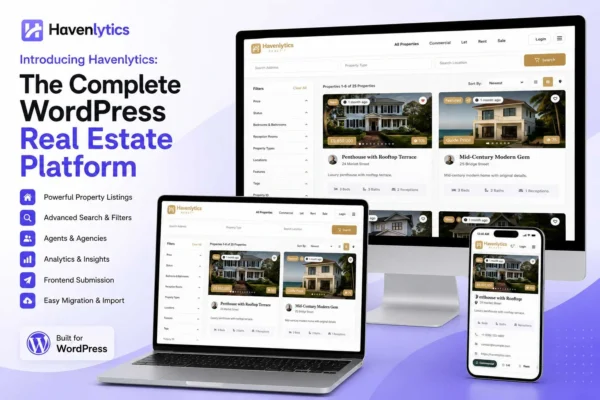
Havenlytics is built specifically on the plugin side of this divide, and that’s a deliberate architectural choice, not a limitation.
It is a plugin, not a theme. Your listings, agent profiles, taxonomies, and settings live independently of whatever design you choose. Use the theme you already have, switch themes next year, restyle the whole site — your property data stays intact through all of it. Template overrides are available when you want direct control over the markup a theme produces, which is the standard, well-understood WordPress approach to customization rather than a workaround.
This is also why the platform can promise something a bundled theme structurally can’t: your inventory isn’t hostage to a single vendor’s design decisions. If you’re migrating from a theme-bundled setup, CSV Import can help bring your existing property data into Havenlytics. The Migration Engine is designed for transferring Havenlytics data between Havenlytics installations, making it useful when moving an existing Havenlytics site to another server, domain, or installation.
We’re not suggesting every real estate theme is a bad product, or that Havenlytics is the only plugin-first option available. We’re describing the architecture we chose and why: because the businesses we build for tend to outlive their first design, and their data shouldn’t have to start over every time the look does.
Common Mistakes
A short list of decisions that seem harmless at the time and cause real cost later:
- Choosing a theme for its listings feature without asking where the data lives. If you can’t clearly answer “does this functionality survive a theme switch?”, assume it doesn’t.
- Assuming “premium” means “safe.” Price and build quality don’t guarantee architectural independence. A well-made theme can still lock in your data.
- Not checking export options before committing. Before you build on any real estate theme or plugin, confirm you can get your listings out in a usable format if you ever need to leave.
- Underestimating how soon a redesign happens. “We won’t redesign for years” is rarely true in practice — brands refresh, markets shift, and three years passes faster than expected.
- Treating this as a developer-only decision. Agency owners and independent agents who never touch code are the ones who feel this decision most, at the exact moment they’re least prepared for a migration project.
Conclusion
The theme-vs-plugin question isn’t really about which category is “better” in the abstract. It’s about where your data lives and who controls it when your design needs change — and for a real estate website, design needs change more often than most owners plan for.
A theme should be free to change because you want a new look. A plugin should own your listings because your business depends on them. Keeping those two jobs separate is the single decision that determines whether your next redesign is a design project or a data-recovery project.
If you’re just getting started, the step-by-step guide to building a real estate website with WordPress walks through exactly where this decision fits into the bigger picture. If you’re ready to see the plugin-first approach in practice, install Havenlytics and explore how listings, search, and agent profiles hold up independently of any theme — or start with the documentation to see how the architecture works before you commit.
FAQ
What’s the real difference between a WordPress theme and a plugin?
A theme controls appearance — colors, layout, fonts, page structure. A plugin adds functionality — like real estate listings, forms, or search — independently of how the site looks. A well-built plugin keeps working exactly the same no matter which theme you’re running.
Can a WordPress theme include real estate features?
Yes, and many do — this is what’s typically marketed as a “real estate theme.” The tradeoff is that listing data built into a theme is often tied to that specific theme, which creates risk if you ever redesign or switch themes later.
Will I lose my property listings if I change my WordPress theme?
It depends entirely on where your listings live. If they’re stored by a theme-independent plugin, changing themes doesn’t affect your listings at all. If they’re built into your current theme’s custom structure, switching themes can break or disconnect them — which is the core risk this article explains.
Is a real estate plugin more expensive than a real estate theme?
Not necessarily — pricing varies by product on both sides. The more meaningful cost comparison isn’t the upfront price; it’s the cost of migrating locked-in data later versus the near-zero cost of switching themes when your functionality lives in an independent plugin.
Does Havenlytics work with any WordPress theme?
Havenlytics is designed to work with a wide range of WordPress themes because its property data and core functionality are handled by the plugin rather than the theme. Theme compatibility can still depend on how a particular theme is built and how it integrates with WordPress.
I already built my site on a theme with built-in listings. Can I switch to a plugin-based approach?
In many cases, yes. CSV Import can help bring existing property data into Havenlytics from supported CSV exports. Once your listings are managed by Havenlytics, the Migration Engine can transfer that Havenlytics data between Havenlytics installations without tying it to a particular theme. You may need to review and map fields depending on the source format.