A property listing is the smallest unit of a real estate website and the thing that carries all the weight. Visitors don’t remember your homepage. They remember whether the listing they clicked had good photos, a clear price, and enough detail to help them decide whether to call.
Creating a listing in WordPress is mechanically simple — fill in some fields, upload some photos, publish. Creating a listing that actually performs, and keeping hundreds of them organized as your inventory grows, is a different skill. That’s what this guide covers: how to structure a listing properly, how to organize a growing inventory so it stays manageable, and how to move from one-at-a-time entry to bulk workflows once your site is doing real volume.
We use Havenlytics as the working example throughout, since it’s the platform this guide’s steps map to directly. If you haven’t yet, it’s worth reading How to Build a Real Estate Website with WordPress first — this article picks up right where that guide’s listings step leaves off, and Real Estate Theme vs Plugin explains why keeping your listing data in a plugin, independent of your theme, is what makes long-term listing management safe in the first place.
What Makes a Good Property Listing?
Before touching the listing editor, it helps to know what you’re aiming for.
A good property listing answers, in order, the questions a buyer actually asks: What is this? Where is it? What is this? Where is it? How much does it cost? How does it look? Is there anything else I need to know? A listing that buries the price, skips the location, or leads with a paragraph of prose before a single photo is fighting the reader’s instincts instead of working with them.
The best listings share three traits. They’re complete — no missing fields that make a buyer guess or leave. They’re scannable — a visitor decides in seconds whether to keep reading, so structure matters as much as content. And they’re accurate — nothing erodes trust in a real estate site faster than a listing that doesn’t match reality once someone actually visits.
Keep those three traits in mind through the rest of this guide; they’re the standard everything below is trying to meet.
Essential Property Information
Every listing needs a baseline of information, regardless of property type or market. At minimum:
- Title — clear and specific (“3-Bed Family Home in Maple Heights,” not “Beautiful Property!!”)
- Price — displayed prominently; if pricing is on request, say so explicitly rather than leaving a blank
- Location — address or area, precise enough to be useful, general enough to respect privacy where needed
- Property type — house, apartment, condo, land, commercial, and so on
- Status — for sale, for rent, sold, pending (more on this below)
- Size — square footage or equivalent, plus lot size where relevant
- Bedrooms and bathrooms — the two filters buyers use most
- Key features — parking, outdoor space, notable amenities
- Description — the narrative that fills in what the fields can’t
- Photos — covered in its own section below
- Agent contact — who to reach, and how
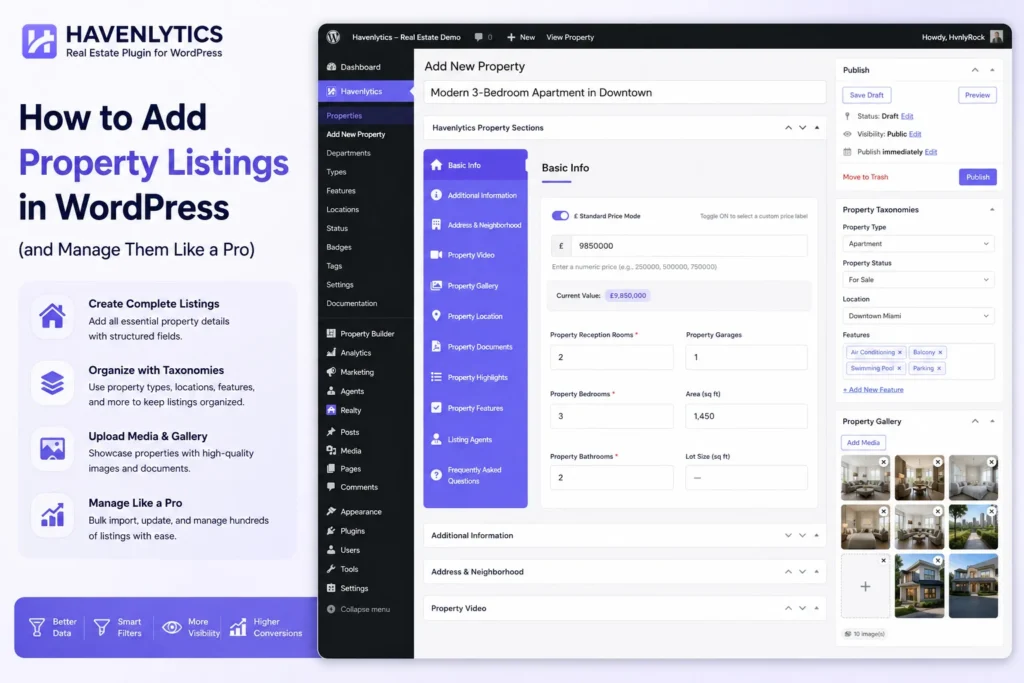
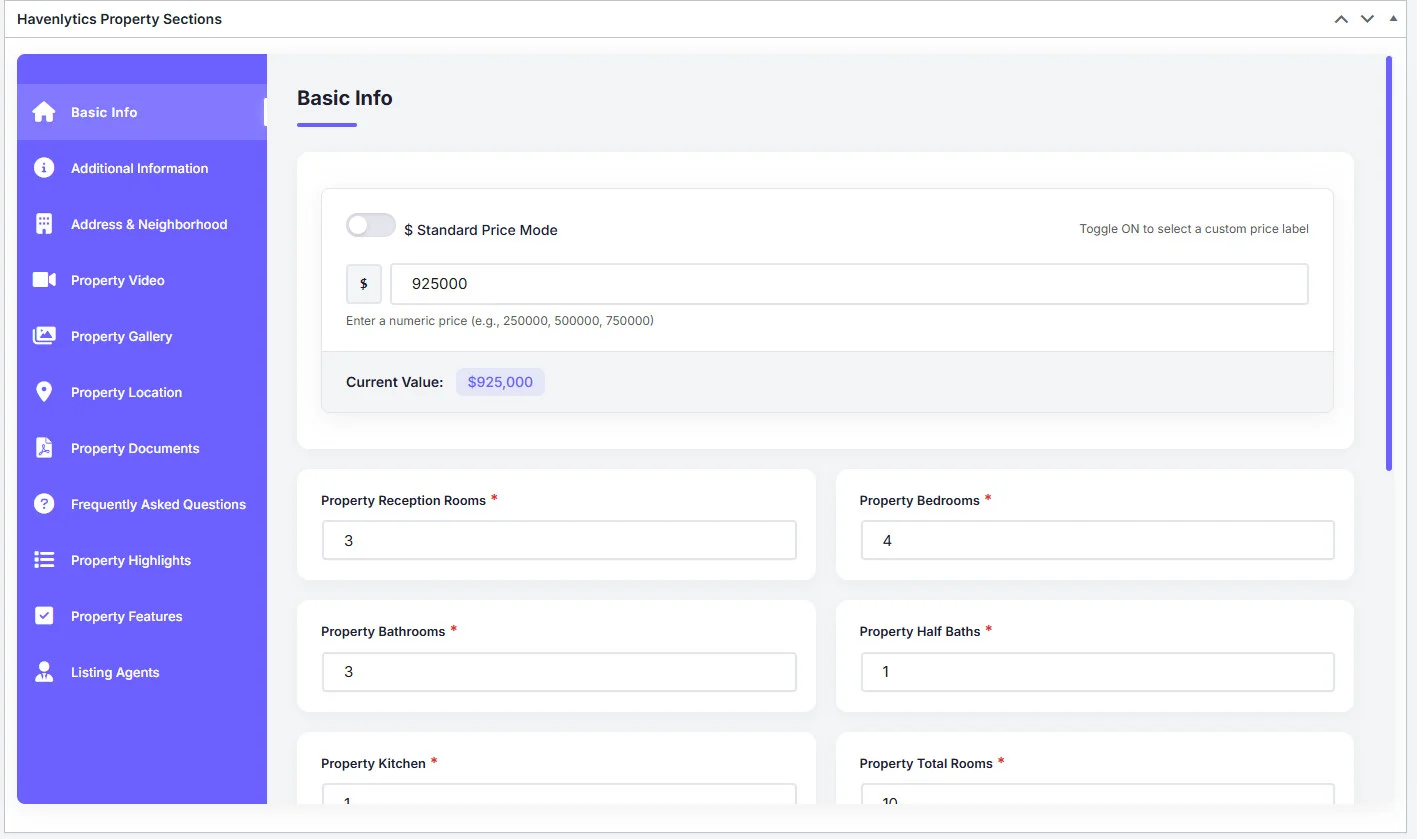
In Havenlytics, the property listing editor is built around exactly this kind of structured entry: each of these lives in its own field rather than getting mashed into a single description box. That structure is what makes the rest of this guide possible — search, filtering, and comparison all depend on information being stored as data, not just as prose.
Organizing Listings with Taxonomies
Fields describe a single listing. Taxonomies describe how listings relate to each other — and they’re what makes a hundred listings feel organized instead of like a pile.
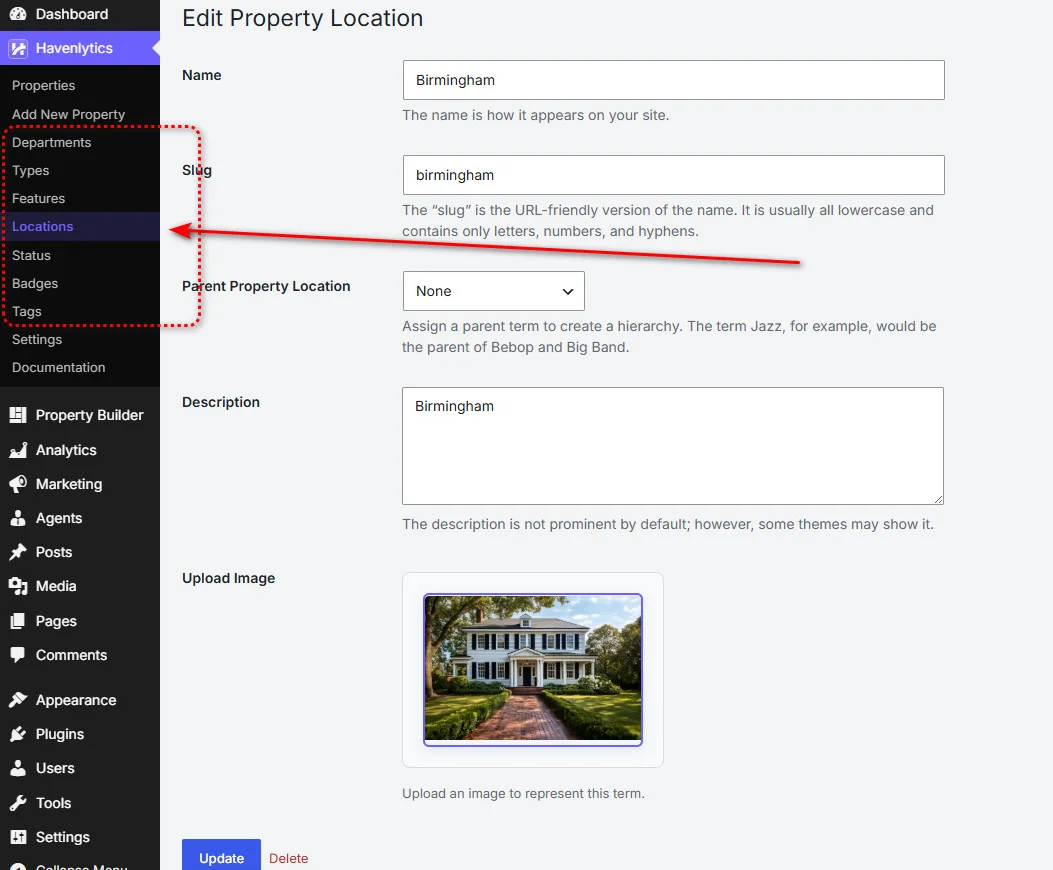
Havenlytics uses property taxonomies for this: property type, status, location, and features are the common groupings, and you can add your own to match your market. A mountain-town agency might add “view type.” A commercial specialist might add “zoning class.” The taxonomy system exists precisely so your classification matches your actual inventory, not a generic template.
Two things make taxonomy decisions worth getting right early:
Search depends on them. Every filter a visitor uses — property type, location, price range, features — pulls from taxonomy data. A listing with vague or missing taxonomy assignments simply won’t surface when someone filters for what it actually is.
Location pages depend on them. If you build pages for specific neighborhoods or cities, consistent location taxonomies are what let those pages automatically pull in the right listings, rather than requiring manual curation every time inventory changes.
A practical rule: assign taxonomies for every listing at the moment you create it, not “later.” Later rarely happens, and an unclassified listing is effectively invisible to anyone using search.
Writing Better Property Descriptions
Fields carry the facts. The description carries the case for why this property, specifically, deserves a visit.
A few practices separate descriptions that work from ones that get skimmed past:
Lead with what’s genuinely distinctive, not generic praise. “Beautifully maintained” describes nothing; “Original hardwood floors throughout, restored in 2023” describes something a buyer can picture.
Write for the search, not just the read. Buyers scan descriptions for the specific things they care about — school district, commute distance, recent renovations. Include the concrete details, not just the adjectives.
Keep paragraphs short. Real estate descriptions get read on phones, standing in front of a listing, often while comparing three tabs at once. Dense paragraphs lose that reader.
Be accurate about condition and limitations. A description that oversells creates a disappointing showing and a wasted lead. Precision builds more trust than enthusiasm does.
Close with a light call to action — inviting a showing, a call, or a question — rather than trailing off after the last feature.
None of this requires a copywriter. It requires treating the description as information design, not marketing copy.
Images and Media Best Practices
Photos are the single strongest factor in how a listing performs, and they’re worth more attention than most of the fields around them.
A few fundamentals: lead with your strongest image — the first photo is effectively the listing’s headline. Use enough photos to tell the full story of the property (exterior, main living spaces, kitchen, bedrooms, bathrooms, any standout feature) without padding the gallery with near-duplicates. Shoot in good light, ideally daylight, and avoid heavily filtered or over-edited images that misrepresent the space.
One technical point matters more than it seems: compress images before uploading. Real estate listing pages are naturally image-heavy, and large, uncompressed files slow every page they’re on — which affects both the visitor’s experience and how your pages perform in search. A gallery of ten well-compressed photos will load faster and look just as good as ten uncompressed ones.
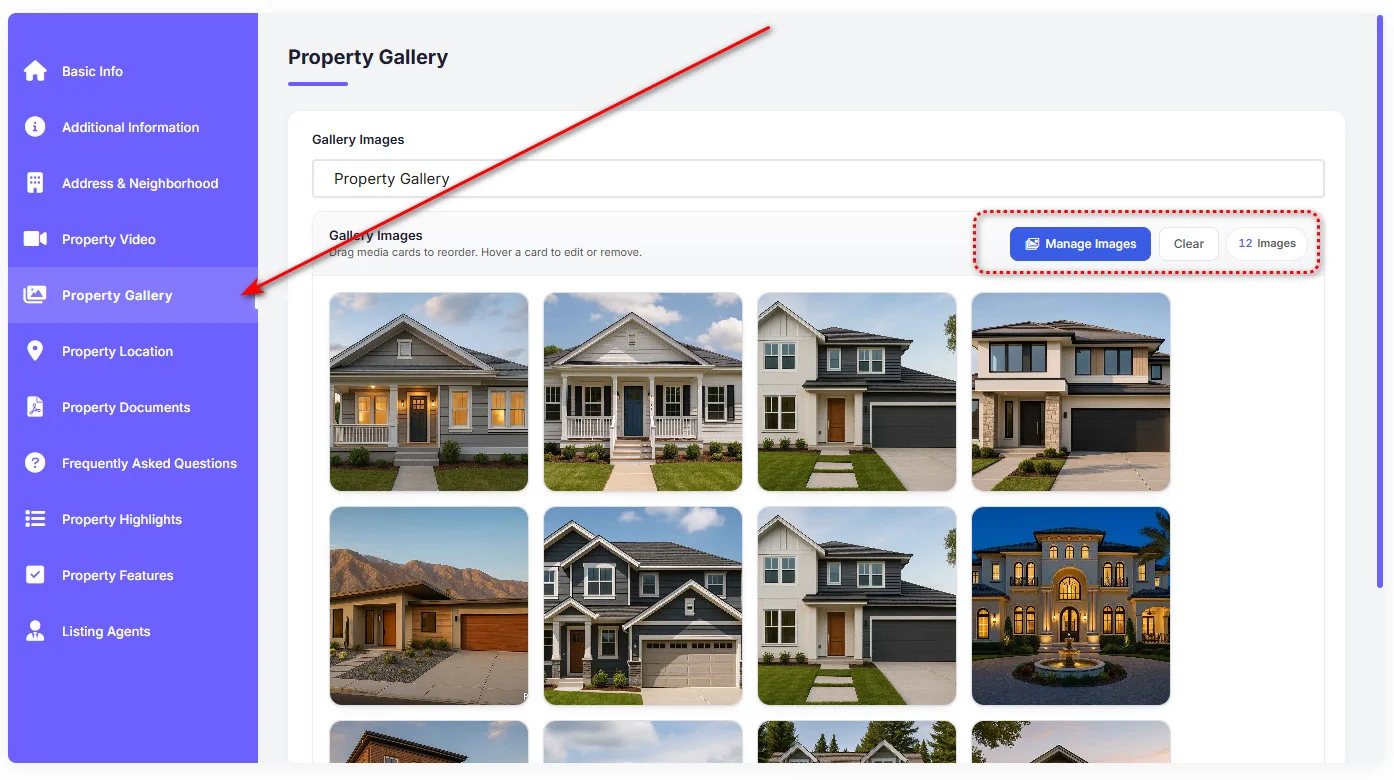
If your listing type calls for it, virtual tours or video can supplement the gallery — but they should supplement, not replace, a strong set of static photos. Not every visitor wants to load a video to see if a property is worth a second look.
Property Statuses
Status is the field that keeps your site honest. A listing marked “for sale” after it’s sold doesn’t just look sloppy — it wastes a visitor’s time and, if repeated, erodes trust in every other listing on your site.
Common statuses to maintain consistently:
- Active / For Sale — currently available
- Pending — under contract, not yet closed
- Sold — closed, kept for portfolio or removed depending on your preference
- For Rent / Rented — the rental equivalents, if you handle rentals
Havenlytics tracks property status as a core part of the listing, which means status changes are reflected everywhere the listing appears — search results, listing pages, agent profiles — without manual updates in multiple places. The discipline that matters is process, not tooling: update status the moment it changes, not during a periodic cleanup. A stale “active” listing sitting for three months is the most common trust problem on real estate sites, and it’s entirely avoidable.
Manual Listing Creation
For most sites, manual entry is how the majority of listings get created — one property, added carefully, when it comes onto the market.
The workflow in Havenlytics: open the listing editor, complete the core fields (title, price, location, status, and the rest from the essentials list above), assign taxonomies, upload your photo gallery, write the description, assign the listing to an agent, and publish.
Manual entry is worth doing even if you’ll eventually rely on bulk import, because it’s the fastest way to learn what the listing editor actually asks for — which fields matter, which taxonomies apply to your market, and what a complete listing looks like before you’re producing dozens of them at once.
CSV Import & Bulk Management
Once you’re managing real volume — dozens or hundreds of listings, or migrating an existing inventory — manual entry stops being practical, and that’s where CSV import earns its place.
The process: prepare your listing data in spreadsheet form, with columns matching the fields you want populated (title, price, location, status, and so on), then use the CSV import to map those columns to the corresponding listing fields. What would take hours of manual entry happens in the time it takes the import to run.
Download
📄 Download Havenlytics Demo.csv
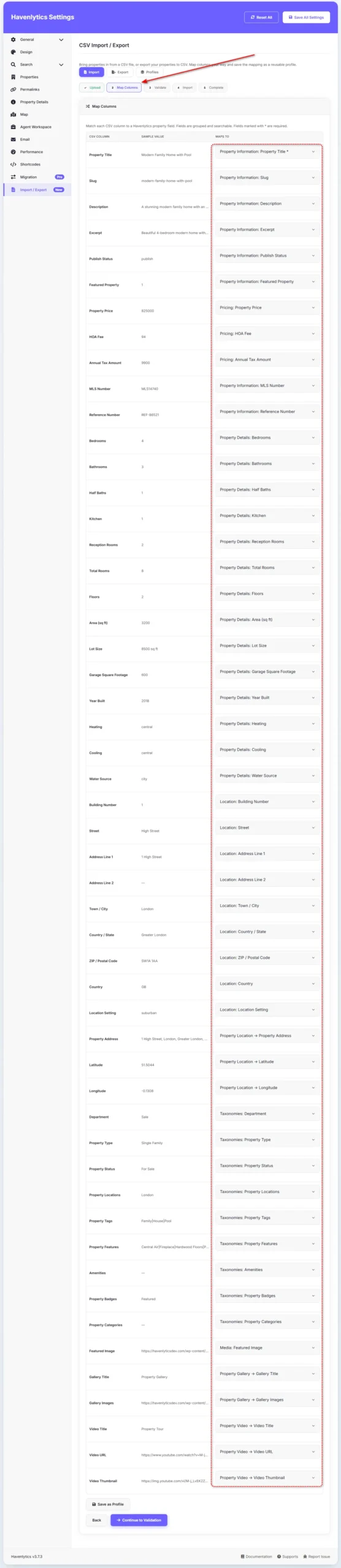
A few habits make bulk import go smoothly: clean your data before importing, not after — consistent formatting for price, status, and location values saves a cleanup pass later. Import a small test batch first if you’re working with an unfamiliar spreadsheet source, so mapping errors show up on five listings instead of five hundred. And plan your taxonomies before the import, since retrofitting classification onto hundreds of already-imported listings is far more tedious than setting it up correctly the first time.
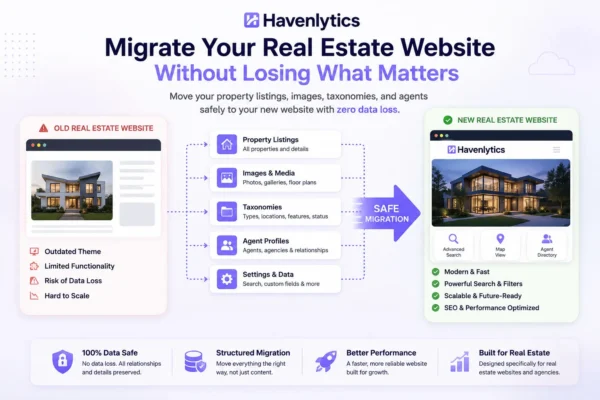
If you’re bringing inventory over from another real estate theme or plugin entirely, check whether you can export the source data to a supported CSV format and use Havenlytics CSV Import to map it into your listings. The Migration Engine is designed for transferring Havenlytics data between Havenlytics installations. We’ll cover that process in a dedicated migration guide.
Frontend Property Submission
Not every listing has to originate in the WordPress admin. If your site is a directory or marketplace model — where property owners, landlords, or outside agents submit their own listings — frontend property submission lets registered users add properties directly from the front end of the site, without ever seeing the admin dashboard.
This is a different operational model from the agency or single-agent workflows above, and it comes with a different concern: trust. When submissions come from outside your team, you’re vouching for information you didn’t personally verify. That’s where identity verification becomes relevant — it lets you confirm who’s behind a submission, which matters most on exactly the kind of directory site where frontend submission is being used.
If you’re running this model, it’s worth deciding upfront what a submission needs before it’s approved and published: complete required fields, at minimum one verified contact method, and a review step rather than automatic publishing, especially early on while you’re establishing quality standards for your directory.
Common Listing Mistakes
A short list of problems that are easy to avoid and expensive to leave uncorrected:
- Missing or vague location data. A listing with an incomplete address or no neighborhood assignment won’t surface in location-based search or area pages.
- Inconsistent status updates. Sold properties left marked as active is the single most trust-damaging error a real estate site makes.
- Weak lead photo. The first image in the gallery gets seen even by visitors who never click through — a mediocre lead photo costs clicks the rest of the listing never gets a chance to earn.
- Unclassified listings. Skipping taxonomy assignment “to do later” quietly breaks search and filtering for that listing until someone catches it.
- Descriptions that oversell. Exaggerated claims create disappointing showings, which cost more in wasted time and lost trust than an honest, modest description ever would.
- Uncompressed images. Slow-loading listing pages hurt both visitor experience and search visibility — an easy fix that’s frequently skipped.
Listing Management Tips
A few habits that keep a growing inventory manageable rather than chaotic:
Do a regular status audit. Once a month, review active listings against reality and update anything stale. This takes minutes and prevents the most common trust problem on real estate sites.
Standardize before you scale. Decide your taxonomy structure, your description format, and your photo requirements before you have two hundred listings to retrofit. It’s far easier to maintain a standard than to impose one retroactively.
Treat listing data as an asset, not a task. Complete, well-structured listings compound in value — they power better search, better location pages, and eventually better analytics, since insight is only as good as the data feeding it. A future guide on real estate website analytics will cover how to turn well-maintained listing data into an understanding of what your market actually responds to.
Assign ownership clearly. Every listing should have a clear agent attached, both for visitor trust and for your own accountability when a listing needs updating.
Conclusion
A property listing looks like a simple form, but it’s really the foundation everything else on a real estate website is built from: search results are only as good as the taxonomy data behind them, trust is only as strong as the accuracy of your statuses, and performance is only as measurable as the structure of the data you started with.
Get the fundamentals right — complete fields, thoughtful taxonomies, honest descriptions, strong photos, current statuses — and every listing you add makes the whole site better, not just one page bigger. Whether you’re adding your first property by hand or importing five hundred through CSV, the same standard applies: complete, scannable, accurate.
If you’re setting this up for the first time, install Havenlytics and try the listing editor with a single property before you scale up — or read the documentation for the full field reference. And once your listings are in place, the natural next step is making sure visitors can actually find the right one: continue to Property Search That Converts to see how search and your taxonomy structure work together.
FAQ
What information should every property listing include?
At minimum: title, price, location, property type, status, size, bedrooms and bathrooms, key features, a description, photos, and agent contact information. These fields are what make search, filtering, and comparison possible — a listing missing several of them is effectively harder to find and less trustworthy to read.
How do I organize a large number of property listings in WordPress?
Through taxonomies — structured classifications like property type, status, location, and features. Assigning taxonomies consistently, starting with your very first listing, is what keeps search accurate and location pages automatically up to date as your inventory grows into the hundreds.
Can I bulk import property listings into WordPress?
Yes. CSV import lets you bring in listings in bulk by mapping spreadsheet columns to listing fields, which is far faster than manual entry once you’re managing real volume. If you’re migrating from another real estate theme or plugin, CSV Import can help when the source data is available in a supported CSV format. For transferring an existing Havenlytics site, use the Migration Engine.
How often should I update my property listing statuses?
As soon as the status actually changes — the moment a property goes under contract or sells, not during a periodic cleanup. A regular monthly audit is a good backstop, but the habit of updating in real time is what prevents stale listings from damaging visitor trust.
Can people submit their own property listings on my site?
If your site is built for it, yes. Frontend property submission allows registered users to add listings from the front end without accessing the WordPress admin — the model directory and marketplace sites use. Identity verification is available to help confirm who’s behind outside submissions before they’re trusted and published.
How many photos should a property listing have?
Enough to tell the full story of the property — typically covering the exterior, main living spaces, kitchen, bedrooms, and bathrooms — without padding the gallery with near-duplicate shots. The first photo matters most, since it’s often seen even by visitors who never click into the full listing.