A real estate website has a harder job than almost any other kind of website.
It has to present hundreds of properties without becoming a maze. Visitors should be able to answer very specific questions — three bedrooms, under a set budget, in one particular neighborhood — in just a couple of clicks. At the same time, the platform needs to make individual agents look credible, keep an entire agency’s inventory organized, and show owners which listings attract the most attention.
Most WordPress sites never have to do any of that. Which is why building a real estate site on WordPress has traditionally meant stitching together a theme from one vendor, a listings plugin from another, a form tool from a third, and hoping the seams hold.
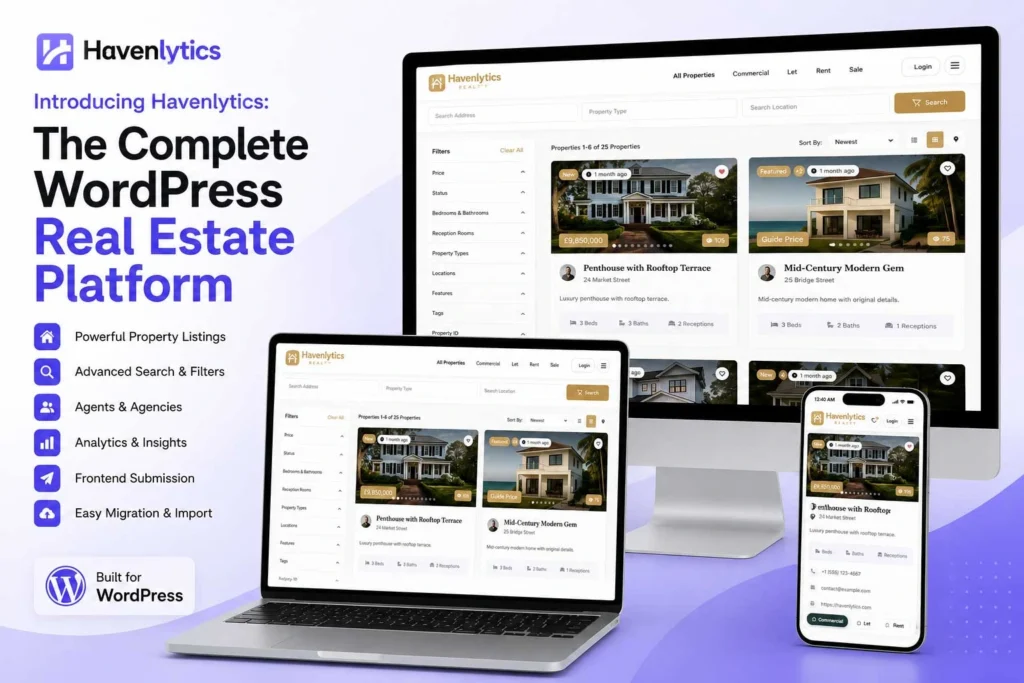
Havenlytics exists to replace that patchwork. It’s a complete WordPress real estate platform: property listings, page building, search, agent and agency management, analytics, and a developer layer, designed together and shipped as one ecosystem.
This article explains what Havenlytics is, the problems it was built to solve, who it’s for, and how its core features fit together. By the end, you’ll know whether it belongs in your stack — and where to go next if it does.
Why Modern Real Estate Websites Need More Than Just Listings
A listings grid is the visible part of a real estate website. It’s maybe 20% of the actual work.
Consider what a working real estate business needs from its site:
| A listings-only setup gives you | A real estate business actually needs |
|---|---|
| A grid of properties | Structured listings with types, statuses, locations, and custom attributes |
| A basic search box | Search that filters by the criteria buyers really use, including map-based browsing |
| One generic author byline | Agent profiles, agency structure, and clear ownership of every listing |
| Page views in a generic analytics tool | Listing-level insight: which properties get attention, and which sit unseen |
| Manual data entry | Bulk import, export, and a route to migrate existing data in |
| A fixed layout | Listing and search layouts you can shape without touching code |
When these needs are met by six different tools, three predictable problems follow.
Data gets trapped. Many real estate themes store listings in ways that only that theme understands. Change your design later and your inventory doesn’t come with you.
Pieces don’t talk to each other. Your search tool doesn’t know what your listings plugin knows. Your analytics tool sees “pages,” not properties. Every integration is your problem to maintain.
Nobody can see the whole picture. When listing data, agent activity, and visitor behavior live in separate systems, questions like “which listings earn the most interest?” have no answer.
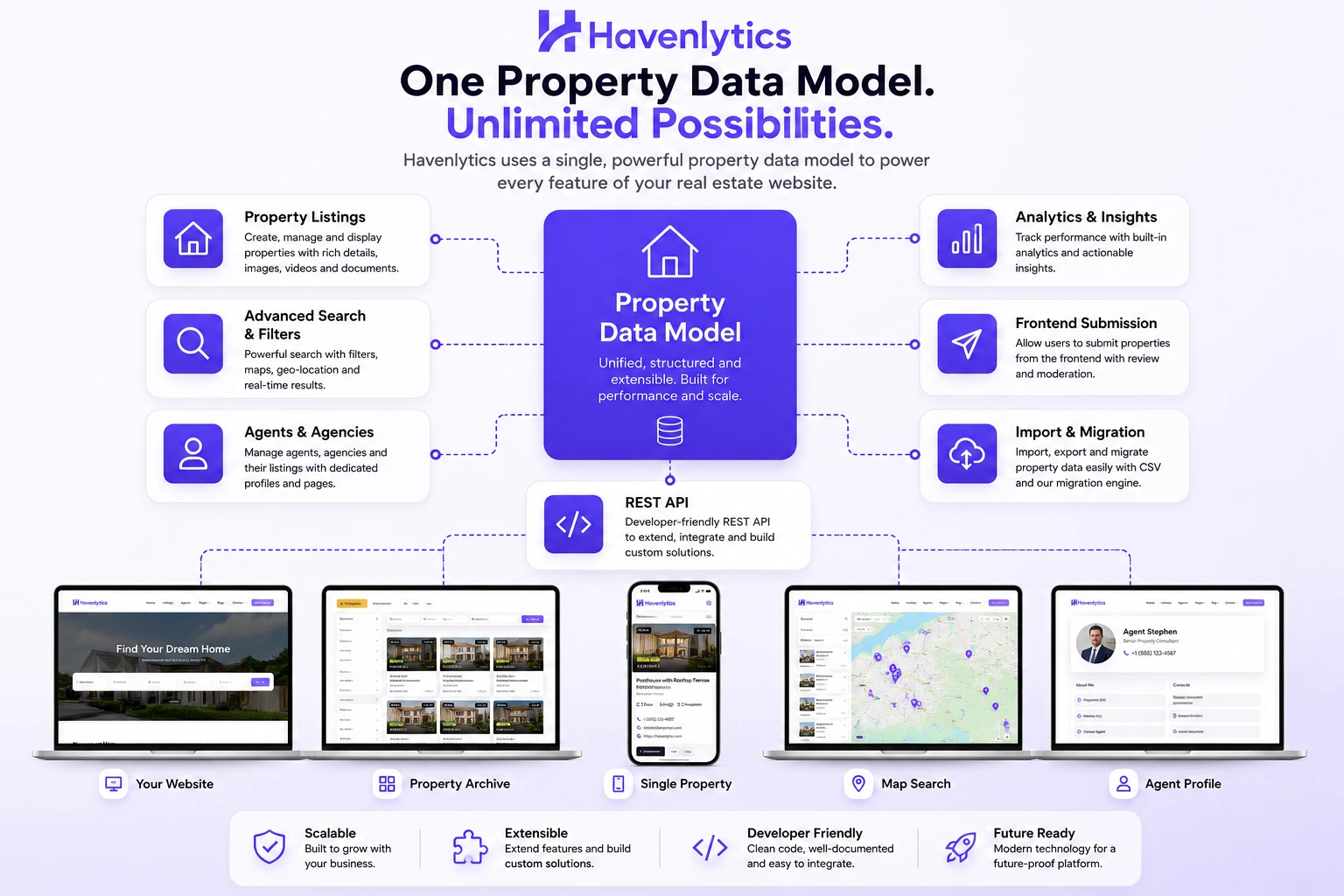
A platform approach solves this by making listings, search, people, and measurement parts of one system that shares one data model. That’s the premise Havenlytics is built on.
What Is Havenlytics?
Havenlytics is a WordPress plugin ecosystem that turns a standard WordPress installation into a full real estate platform.
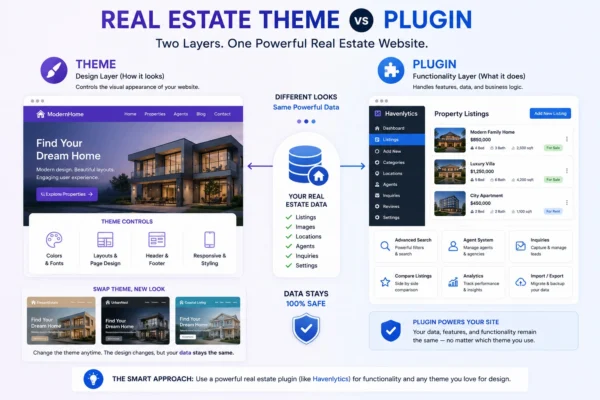
It is a plugin, not a theme. Your listings, taxonomies, agents, and settings live independently of your design. You can use Havenlytics with the theme you already have, restyle your site next year, and keep every property intact. Template overrides are available when you want full control over markup.
It’s also a different proposition from a hosted real estate website builder: instead of renting a site that lives on someone else’s platform, you own the site, the data, and the stack.
“Platform” is the accurate word because Havenlytics covers the full lifecycle of a real estate website:
- Structure : property listings with flexible taxonomies for types, statuses, features, and locations
- Presentation : a Property Builder for listing layouts, plus native Gutenberg blocks and Elementor widgets
- Discovery : a Search Builder and interactive maps
- People : an Agent Workspace and agency management, with identity verification
- Insight : an analytics dashboard built around properties and agents, not just pageviews
- Data : CSV import and export, and a Migration Engine for moving off other solutions
- Extension : a REST API and template overrides for developers
One data model underneath, one settings surface on top, and a modern setup wizard to get from installation to a working site.
Who Should Use Havenlytics?
Havenlytics is built for several audiences, and the platform shape serves each differently.
Real estate agencies. Agencies get structure: every agent under the agency umbrella, every listing owned by someone, and an analytics view of how the whole operation performs online. Agency management keeps the roster organized as the team changes.
Independent agents. A solo agent gets a professional site without hiring a developer. The setup wizard, Property Builder, and ready-made blocks handle what used to require custom work.
Property managers. If you’ve been searching for a property management plugin for your listing portfolio, this is the same job Havenlytics does with different inputs: bulk CSV import and export, clear property statuses, and taxonomies that model whatever inventory you manage — including portfolios that change weekly.
Directory websites. Anyone evaluating a real estate directory plugin needs two things above all: a way for outside users to submit listings, and a reason to trust what they submit. Frontend property submission covers the first; identity verification covers the second. Together they’re the foundation of a listings marketplace.
WordPress developers, freelancers, and web agencies. If you build client sites, you get a REST API, template overrides, and a plugin that doesn’t fight your theme choices. Build the design your client wants; let Havenlytics run the real estate machinery underneath.
If you’re still deciding how to structure your project, our upcoming guide on building a real estate website with WordPress walks through the whole process from an empty install. This article’s job is just to show you the pieces.
Core Platform Features
Here’s what ships in the platform today, and why each piece matters.
Property Listings
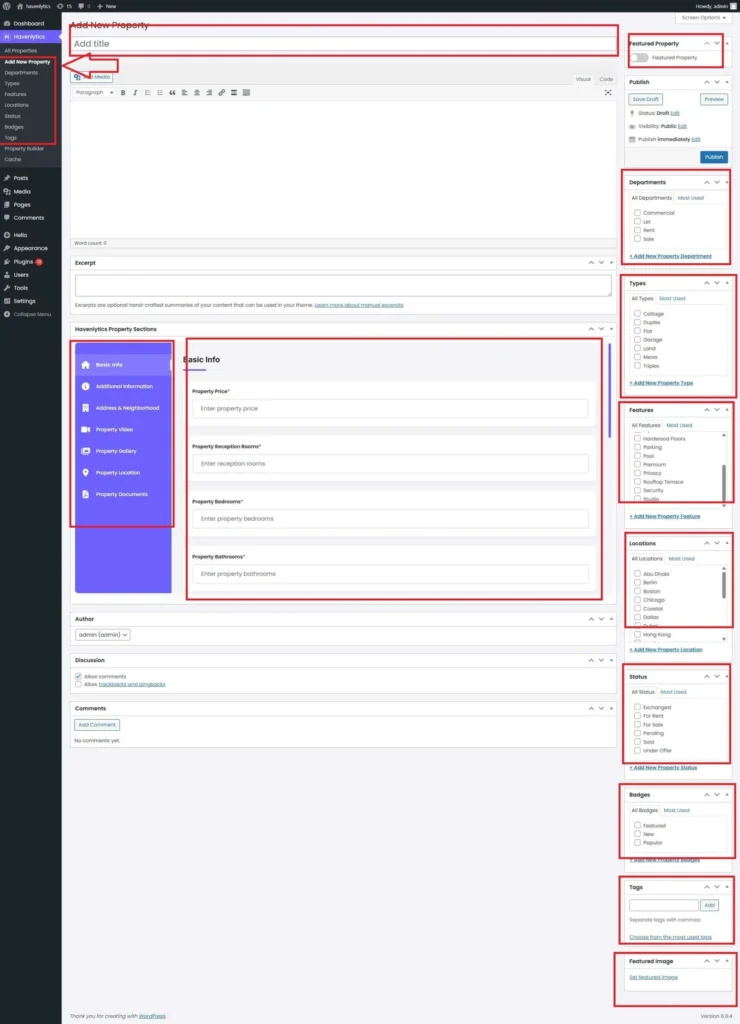
Everything starts with the listing. Havenlytics gives properties their own structured home in WordPress — not blog posts wearing a costume, but purpose-built records with the fields real estate actually needs.
Property taxonomies let you classify inventory the way your market works: property types, statuses, features, cities, neighborhoods, and your own custom groupings when the defaults don’t fit. Visitors can save properties with favorites, and if your model calls for it, frontend property submission lets registered users add listings without ever seeing the WordPress admin.
Property Builder
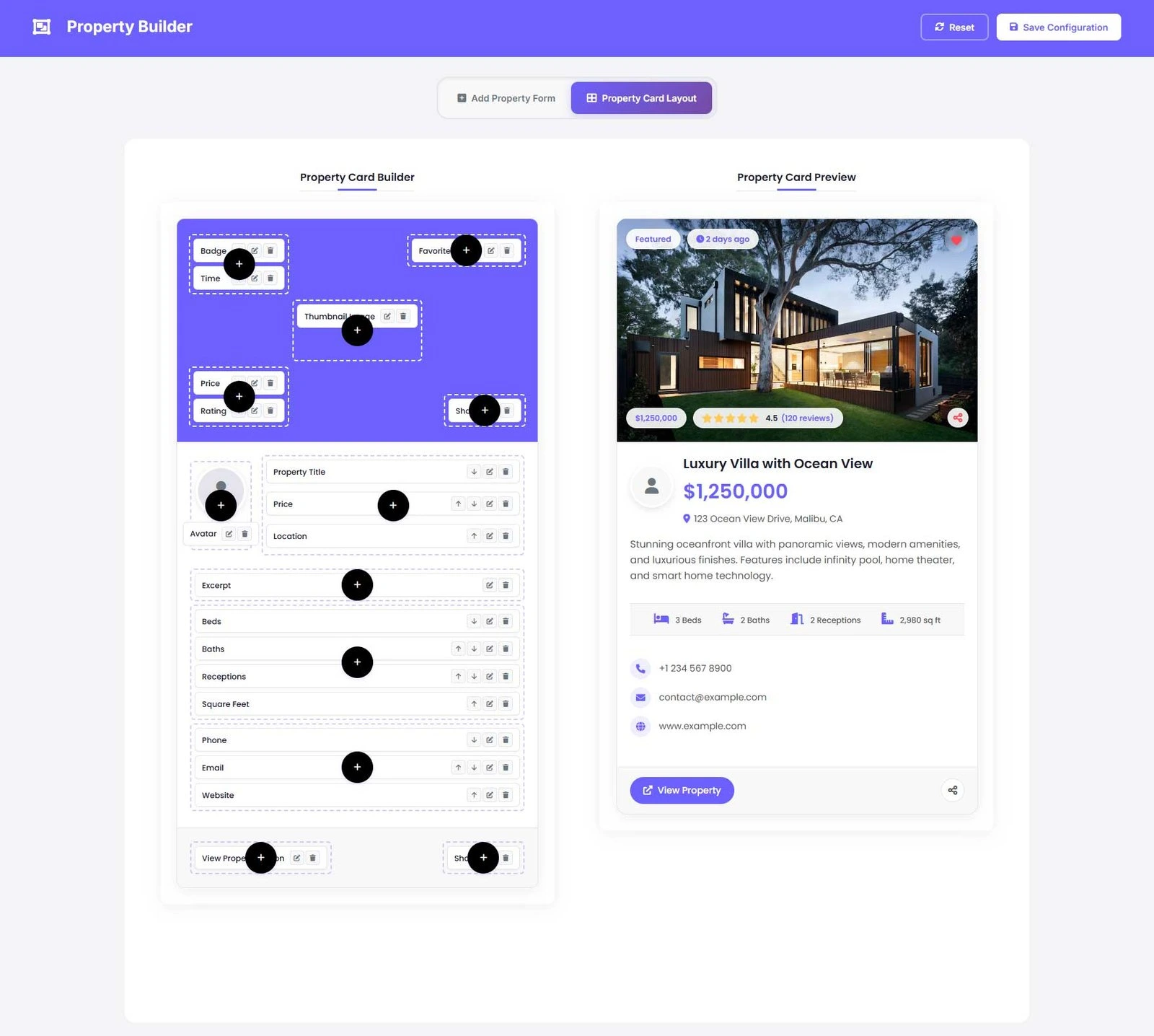
Every market presents property information differently. The Property Builder lets you decide what a listing page contains and how it’s arranged — which fields appear, in what order, in what layout — without editing templates.
The point is control without code: when your agency wants the year built displayed above the price, that’s a settings change, not a support ticket.
Search Builder
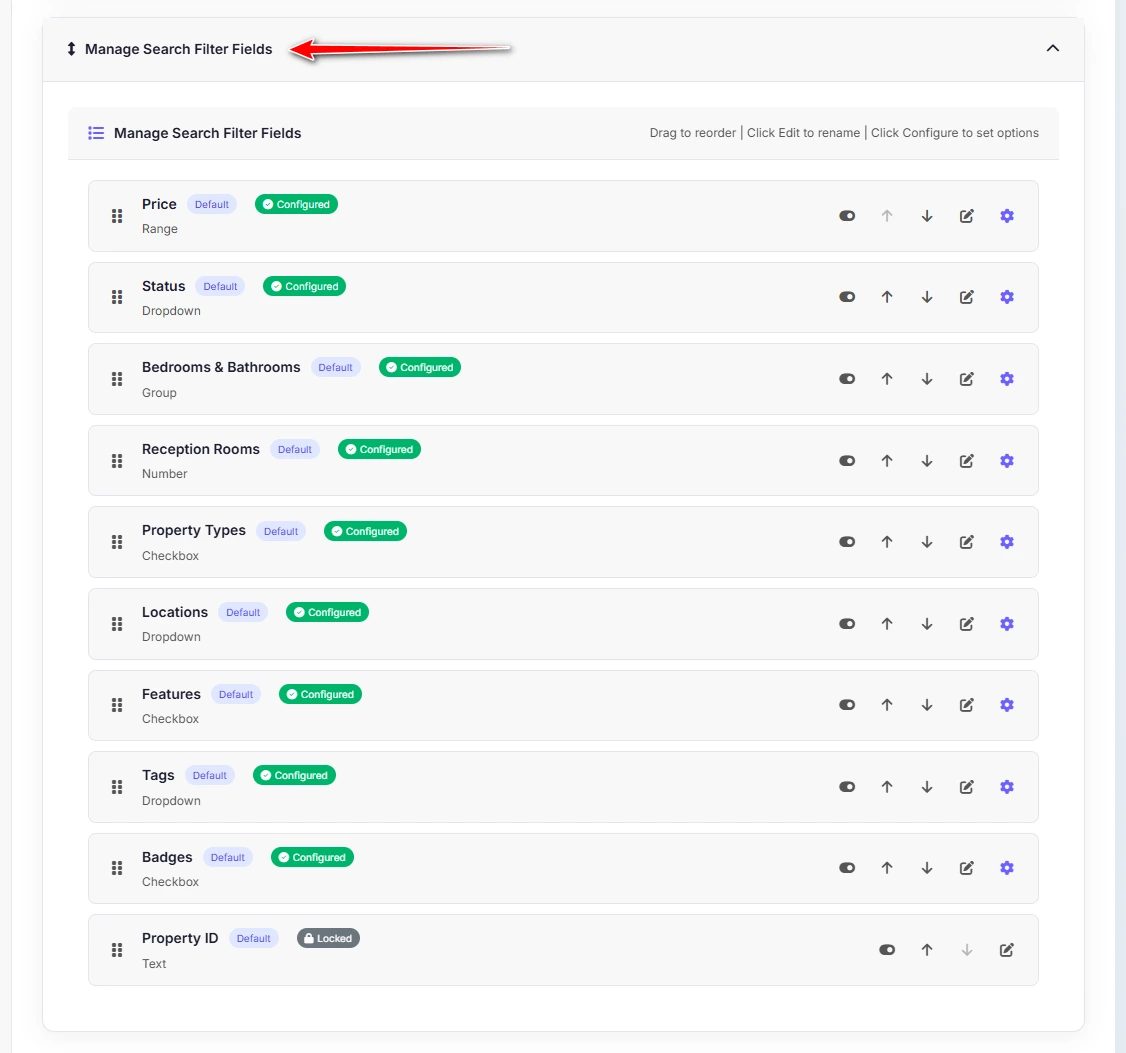
Search is where visitors decide whether your site is useful. The Search Builder gives you the same control over search that the Property Builder gives you over listings: choose which filters appear, how they behave, and how results are presented.
Because search is generated from your actual property data and taxonomies, filters stay in sync with your inventory. Add a new property type and it’s searchable — no rewiring.
Agent Workspace
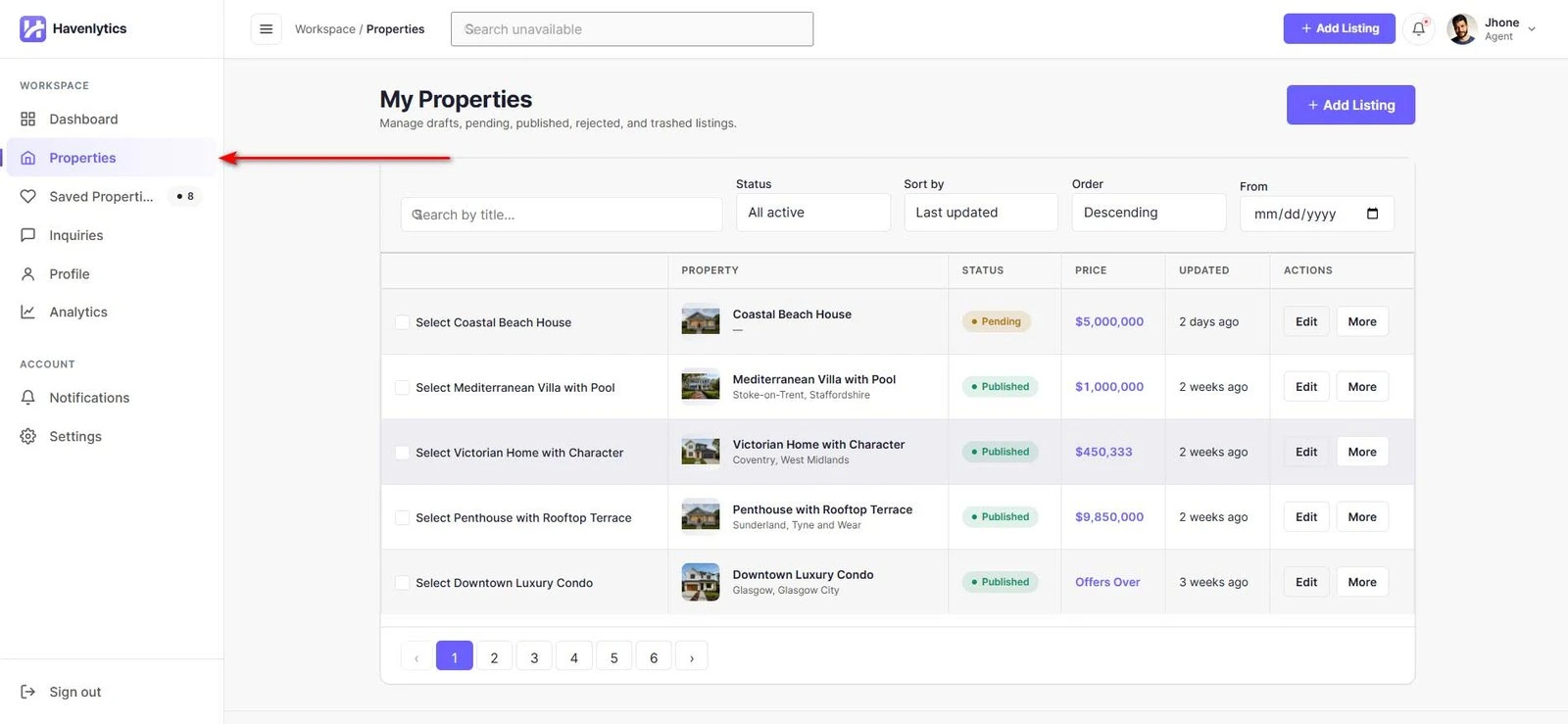
Real estate runs on personal trust, and Havenlytics treats agents as first-class citizens. The Agent Workspace gives each agent a professional presence — profile, photo, contact details, and their listings — while agency management organizes agents into the structure your business actually has.
Identity verification adds a trust layer on top: agents and submitters can be verified, which matters most on directory sites where visitors are deciding whether to contact a stranger.
Analytics Dashboard
This is the part of the platform that most listing tools skip entirely.
Generic analytics tools tell you a page got 400 views. The Havenlytics analytics dashboard tells you which property got 400 views and how attention is distributed across your inventory and your team. It’s measurement built around the objects you care about — properties and people — rather than URLs.
For an agency owner, this closes the loop: you don’t just publish listings, you learn from them.
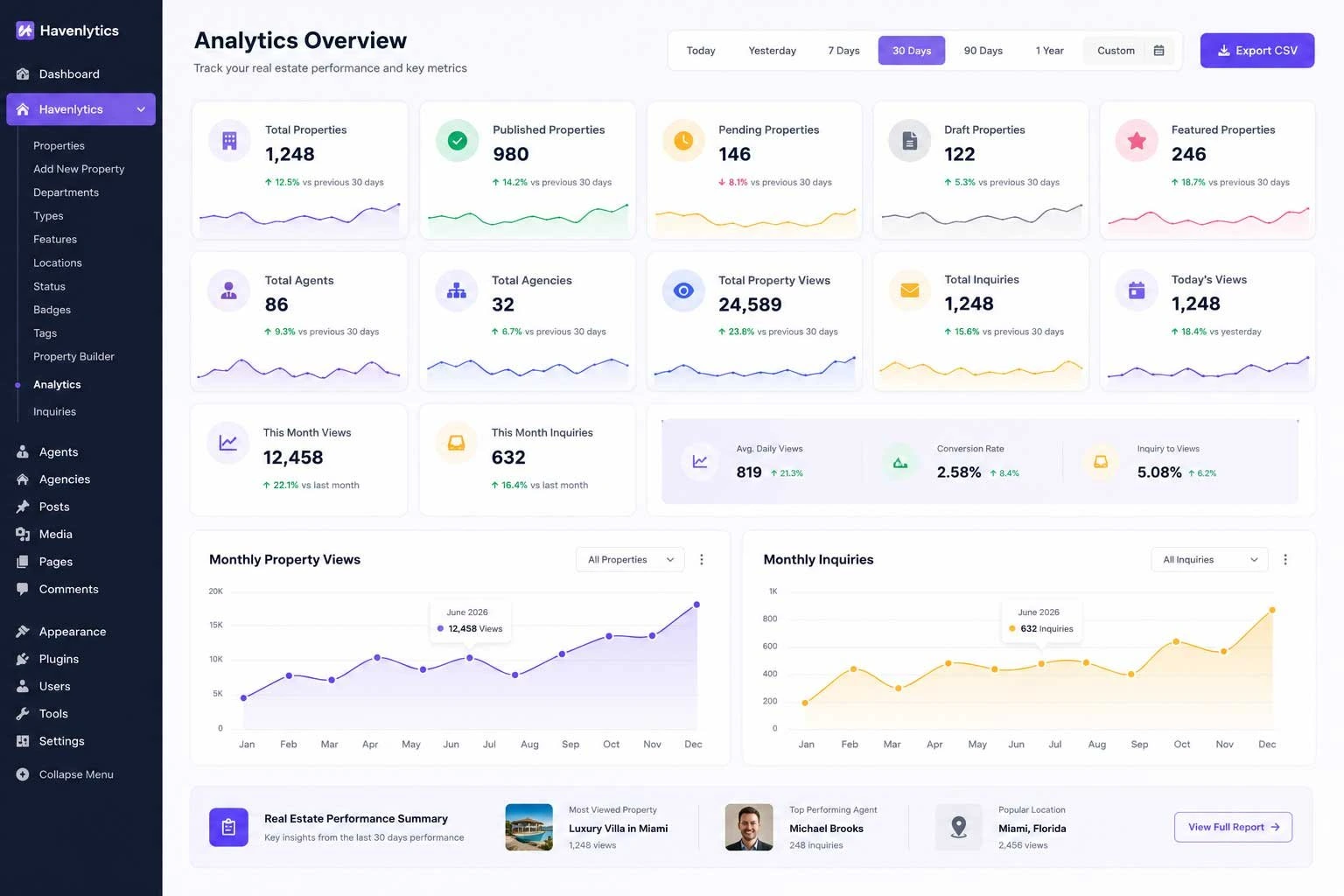
Curious what this looks like with real inventory? Explore the analytics documentation — it walks through each report.
Migration Engine
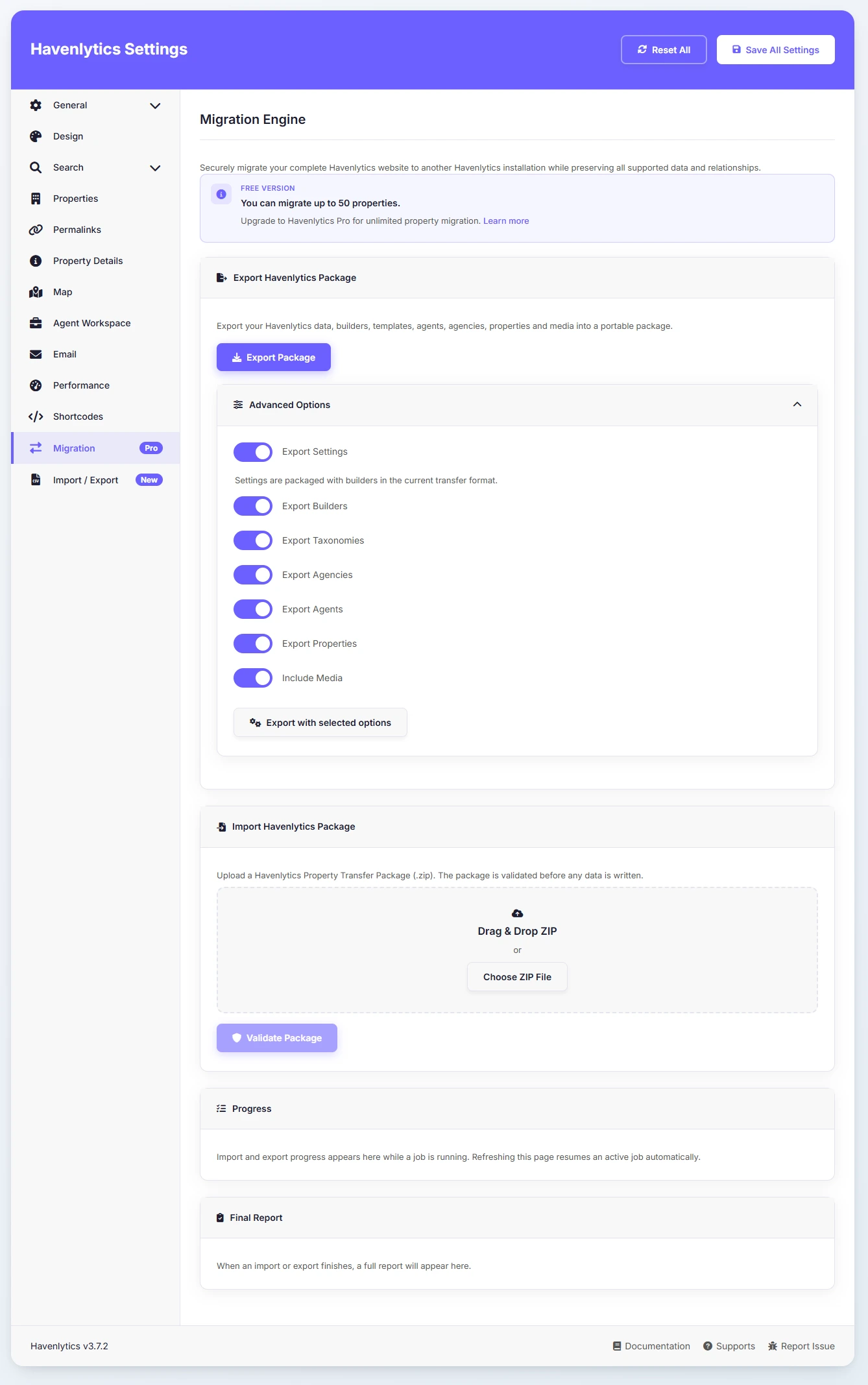
Most people evaluating Havenlytics aren’t starting from zero. They have an existing site with real inventory in it, and the Migration Engine exists so that switching doesn’t mean retyping.
It moves your property data into Havenlytics’ structure so your history comes with you. Combined with the plugin’s theme independence, it removes the biggest reason sites stay stuck on tools that no longer fit.
CSV Import & Export
For everything else, there’s CSV. Bulk-import inventory from a spreadsheet, export your listings for reporting or backup, and keep Havenlytics compatible with whatever offline workflow your office already runs. Property managers with fast-moving portfolios will use this weekly; everyone else will be glad it’s there the day they need it.
Interactive Maps
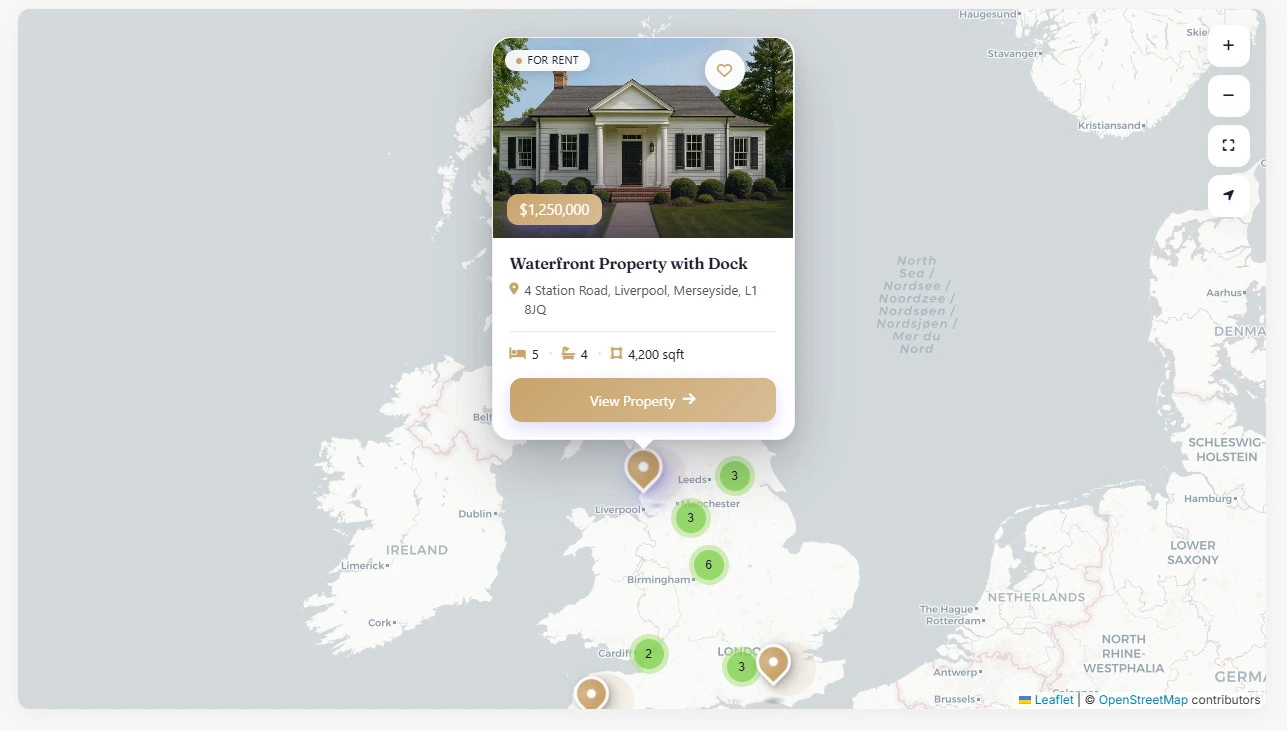
Buyers think in locations before they think in listings. Interactive maps let visitors browse inventory geographically, seeing what’s available where rather than scrolling an abstract grid. Maps work hand-in-hand with search, so location becomes a filter like any other.
Gutenberg Blocks
If you build pages with the WordPress block editor, Havenlytics speaks your language. Native Gutenberg blocks let you drop listings, search, and other platform elements into any page and arrange them like any other content — with the block editor’s own live preview, and no shortcodes to memorize.
Elementor Widgets
Elementor users get the same treatment: purpose-built widgets that bring Havenlytics content into Elementor layouts. Design your pages with the tool you’re fluent in; the widgets keep property data flowing into them. We’ll publish a full walkthrough of page-builder workflows in a future article.
REST API
Every capability described above sits on data, and the REST API makes that data available to whatever you want to build: mobile apps, external dashboards, integrations with tools we’ve never heard of. If you can consume an API, you can extend Havenlytics beyond WordPress itself.
Developer-Friendly Architecture
A few design decisions matter specifically to the people who build and maintain sites for others.
Theme independence. Havenlytics doesn’t require its own theme and doesn’t trap data in one. Bring any well-built theme; the platform provides the real estate layer, structured the way WordPress developers expect — properties as their own content type with their own taxonomies, not overloaded posts.
Template overrides. When default markup isn’t what a project needs, override templates in your theme and take full control of the output — the standard WordPress pattern, applied consistently.
A real API. The REST API isn’t an afterthought; it’s the same structured data the platform runs on, exposed for your use.
Multilingual support. Real estate is local, and local is rarely one language. Havenlytics is built to operate in multilingual setups, so a bilingual market doesn’t require a parallel site.
For agencies and freelancers, the practical consequence is repeatability: a stack you can deploy for one client, then the next, without relearning it each time.
Why Havenlytics Is Different
We won’t claim to be the only real estate solution for WordPress — we’re not. The honest difference is architectural.
Most options in this space are either themes (design-first, with listings bolted on and data locked in) or single-purpose plugins (listings or search or profiles, integrated by you). Havenlytics is a platform: the listing structure, the builders, the people layer, the analytics, and the data tools share one foundation and were designed as one product.
Three consequences of that choice:
- Analytics is native. Because measurement is part of the platform, insight arrives without integration work — and it speaks in properties and agents, not URLs.
- Your data outlives your design. Theme changes, redesigns, and rebrands don’t threaten your inventory.
- Leaving other tools is engineered, not endured. The Migration Engine and CSV tools exist because switching costs are the real barrier in this market, and we’d rather remove them than exploit them.
To be equally honest about the other direction: if all you need is five listings on a brochure site, a platform may be more than your project calls for. Havenlytics earns its keep when listings, people, and growth are the point.
Getting Started
The setup path is deliberately short:
- Install the Havenlytics plugin on any WordPress site (see: Installation & Quick Start).
- Run the setup wizard — it walks you through the core decisions: property structure, pages, and initial settings (see: Setup Wizard guide).
- Add your first listings by hand, by CSV import, or through the Migration Engine if you’re coming from another solution (see: CSV Import / Migration docs).
- Shape your listing pages and search with the Property Builder and Search Builder.
- Watch the Analytics Dashboard start telling you what’s working.
The documentation covers every step in detail. Start with Installation & Quick Start, then follow the path that matches your situation: fresh build, CSV import, or migration.
What’s Next
This article is the front door to a much larger library we’re building. Over the coming weeks, the Havenlytics blog will publish practical, evergreen guides, including:
- A step-by-step guide to building a complete real estate website with WordPress
- Real estate theme vs. plugin: which should power your website?
- Adding and managing property listings efficiently — including bulk CSV workflows
- Designing property search that visitors actually use
- Making sense of your real estate website analytics
- A developer’s guide to template overrides and the REST API
Each guide teaches the underlying concept first and uses Havenlytics as the worked example — the same principle this article follows.
Conclusion
The gap between “a website with listings on it” and “a real estate platform” is where most agent and agency websites quietly underperform. Fragmented stacks leak data, hide insight, and make every improvement a project.
Havenlytics closes that gap with one integrated system: structured property listings, builders for pages and search, a proper home for agents and agencies, analytics that speak real estate, and the import, export, and migration tools that make adopting it practical.
If that matches the site you’re trying to run, install the plugin and take the setup wizard for a spin or start with the documentation and see exactly how the pieces work before you commit. And if you’re still in research mode, that’s what this blog is for: the next guide, on building a real estate website with WordPress step by step, is the natural place to continue.
FAQ
Is Havenlytics a theme or a plugin?
A plugin. Havenlytics adds a complete real estate layer , listings, search, agents, analytics — to any WordPress site, and works with the theme you already use. Your property data stays independent of your design.
Can I migrate from another real estate plugin or theme?
Yes. The Migration Engine moves existing property data into Havenlytics, and CSV import covers spreadsheet-based inventory. You don’t have to rebuild your listings by hand to switch.
Does Havenlytics work with Elementor and the block editor?
Both. It ships native Elementor widgets and Gutenberg blocks, so you can place listings, search, and other platform elements with whichever editor you prefer.
Can visitors submit their own properties?
Yes. Frontend property submission lets registered users add listings from the front end of the site , the foundation for directory and marketplace sites. Identity verification is available to keep submissions trustworthy.
Does it support multiple languages?
Yes. Havenlytics includes multilingual support, so you can serve markets where listings need to exist in more than one language.
Is Havenlytics only for large agencies?
No. Independent agents and property managers use the same platform , the setup wizard and builders are designed so a solo user can launch without a developer, while agency management and the Analytics Dashboard scale up when a team does.
How much does Havenlytics cost, and what does it need to run?
Pricing and current system requirements live on the official site and in the documentation , see the pricing page and the Installation & Quick Start guide for the up-to-date details.